FilmCraft is a clean-room project written from scratch in Rust by the ArtCraft team. It contains no Adobe code, icons, presets or LUTs; even the video codecs are its own, written from the public specifications. On filmcraft.run/editor you get the same app as the desktop download, compiled to WebAssembly: free, with no account and no upload.
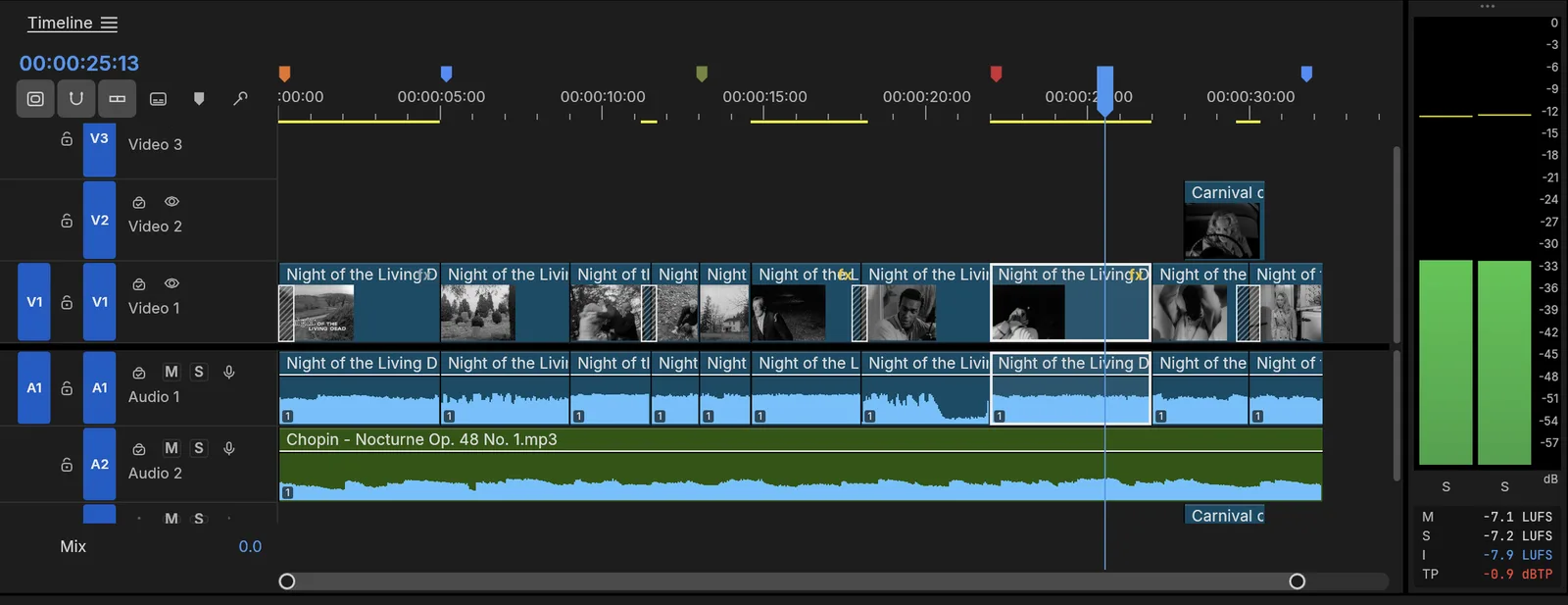
What carries over from Premiere Pro?
| Area | In FilmCraft |
|---|---|
| Layout | Project panel and bins, Source and Program monitors, Timeline, Effect Controls; the Editing, Assembly, Color, Effects and Audio workspaces, with dockable panels |
| Editing | Three-point editing with insert (,) and overwrite (.), lift (;) and extract ('), add edit (⌘K), nesting, multicam, ripple delete and close gap, snapping, unlimited undo with a History panel |
| Trimming | Ripple, roll, slip, slide, rate stretch and razor tools; Q and W ripple-trim to the playhead; a Trim Monitor and dynamic trimming with J, K and L |
| Color | A Lumetri-style panel: Basic Correction, Creative looks, Curves, Color Wheels, HSL Secondary and Vignette, with waveform and vectorscope |
| Effects | Premiere 26’s Video Effects bin (93 effects in 16 folders), the Legacy bin, about 30 transitions, 26 blend modes and Bezier keyframes with value and velocity graphs |
| Audio | Audio Track Mixer and Audio Clip Mixer, automation modes, clip effects, and loudness meters to ITU-R BS.1770 and EBU R128 |
| Titles and captions | Type, Shape and Pen tools on the Program monitor; caption tracks in Subtitle, CEA-608, CEA-708 and Teletext formats; SRT, WebVTT and SCC import and export |
| Shortcuts | A Keyboard Shortcuts editor with presets for Premiere Pro, Final Cut Pro and Avid key layouts |
How do you move a Premiere sequence to FilmCraft?
- In Premiere Pro, select the sequence and choose File › Export › Final Cut Pro XML….
- Open the FilmCraft editor and drop the
.xmlfile on it, together with the media files the sequence uses (or use File › Import). - FilmCraft merges the XML’s bins, media and sequences into your project as one undoable step. If a clip shows as offline, relink it to its file.
- Check the cut, then save with File › Save, which downloads an
.fcprojproject file.
The same route works from DaVinci Resolve, which also exports Final Cut Pro 7 XML. FilmCraft also reads FCPXML 1.9 to 1.11, OpenTimelineIO, CMX 3600 EDL and AAF, and writes all of those plus OMF for audio post.
What can you export?
File › Export › Media… opens Export mode, with H.264 MP4 and AAC sound by default. The encoders are FilmCraft’s own Rust code, so the browser build writes the same file as the desktop app; it arrives as a download. The format list also has Apple ProRes 422 HQ and Motion JPEG in QuickTime, MXF, PNG sequences, animated GIF and WAV. Captions can be burned into the picture or written as a sidecar SRT or WebVTT file.
What doesn’t carry over yet?
- Premiere files. No
.prprojprojects; bring sequences over as XML, AAF or OTIO. - Plug-ins. No VST3, Audio Units or OpenFX hosting.
- Delivery codecs. H.264 is the only software delivery codec. H.265 export needs a hardware encoder in the desktop app, and AV1 export isn’t there yet.
- Maturity. FilmCraft is in alpha. Its developers measure about 86% of Premiere Pro’s menu items, effects, transitions, panels and formats, and estimate it at about 56% ready for real work. Camera and phone files in the wild are less tested than conformance streams.
In the browser, also expect:
- One thread. Decoding, rendering, mixing and encoding share the page’s single thread, so playback and export of heavy timelines are slower than on the desktop.
- Some desktop features report an error. Render previews, proxies, Project Manager and mask tracking need threads the web build doesn’t have yet.
- No built-in speech to text. Transcription isn’t compiled into the web build. The AI panel transcribes on your own API key and fills the same Transcript and caption features.
- Your files stay where they are. Imported media are read from your disk while the page is open, and copied into the browser’s private storage (files up to 4 GiB) so a recovered project finds them after a reload.
If those matter, the desktop app is the same program without the browser limits.
How do you get started?
- Open the editor at filmcraft.run/editor. The first visit downloads the app and opens a demo project to explore.
- Pick your keys. Edit › Keyboard Shortcuts… switches to the Premiere Pro preset if you want Premiere’s exact layout.
- Bring in footage. File › Import, or drop files anywhere on the editor.
- Edit the way you would in Premiere: mark In and Out in the Source monitor, insert or overwrite, trim on the timeline, grade in the Color workspace.
- Save and export. File › Save downloads the project; File › Export › Media… writes the video.
Click into the app before using shortcuts: keyboard input goes to the editor once it has focus. Some shortcuts, such as ⌘M or ⌘N on a Mac, are taken by the browser first, so use the menus for those.
FAQ
Is FilmCraft really free?
Yes. It is open source under MIT OR Apache-2.0, with no account, no subscription and no watermark. The license covers the software; it puts no conditions on the videos you export with it.
Can I open my .prproj files?
No. FilmCraft can’t read Premiere Pro projects yet. Export the sequence from Premiere as Final Cut Pro XML, AAF or OpenTimelineIO and import that instead; cuts, transitions, Motion, Opacity, Time Remapping and audio levels come across in the XML.
Do Premiere plug-ins and VST effects work?
No. FilmCraft hosts no VST3, Audio Units or OpenFX plug-ins. Its own effects cover Premiere 26’s Video Effects bin by name, and its audio effects (EQ, dynamics, DeNoise, DeHummer, reverb and more) are its own code.
Is the online version slower than the desktop app?
Usually. The browser build runs single-threaded, while the desktop app renders frames on worker threads and can use hardware video encoders. Short HD edits work well online; long or 4K projects are better in the desktop app, which is the same program.
Just need to shorten a clip? Follow how to trim and cut a video online. Need subtitles? The AI subtitle generator captions your sequence on your own key.